Hand off your HR busywork to Plane Agent
Plane Agent can now do virtually anything in Plane. It handles HR & payroll tasks, plus the chasing, checking, and follow-ups. You keep the key decisions.
Author
Last Update

Table of Contents
Loading headings...
People teams do extremely important work for their companies, from hiring and payroll to overseeing compliance to navigating employee relations. But much of your time gets eaten up by administrative work. You’re chasing signatures, moving data between systems, and checking that what should have happened actually did.
That work has to get done, but it shouldn’t take up your whole week. Starting today, Plane Agent can take nearly all of the busywork off your plate, so you can focus on the meaningful part of your job.
Plane Agent is now out of beta and included with all Plane plans. It’s no longer an assistant that mainly answers questions. It’s also a coworker you can delegate responsibilities to.
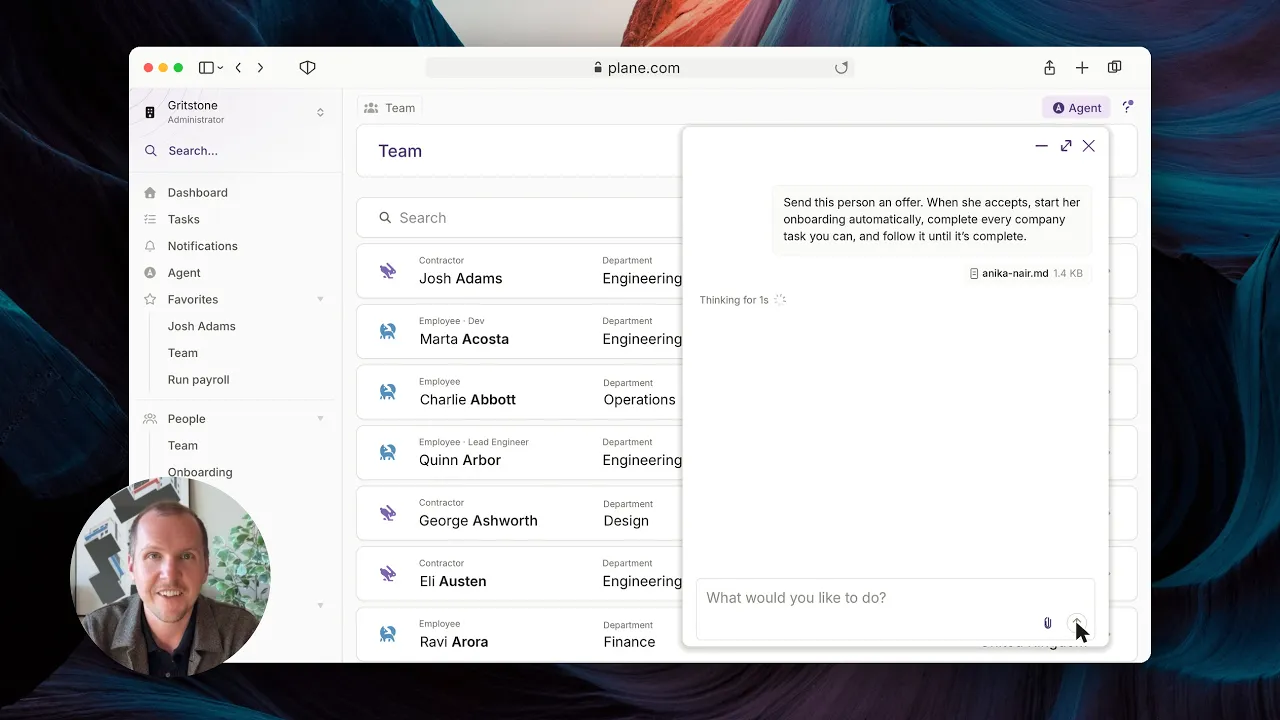
Watch Matt hand a new hire to Plane Agent and see it through: the request, the agreement flagged for his signature, the approval, and updates as the new hire finishes each step.
Handle virtually anything you need
In beta, Plane Agent mostly answered HR and payroll questions. Now it can also do the work. Admins and managers can ask it to do most of what they can do in the Plane app. You just say what you need.
Pay. Tell Plane Agent to add a $130 reimbursement for Sam to the next pay run. It shows you which pay run and the amount, and asks you to accept.
Offer to onboarding. Ask Plane Agent to send offer letters and onboard one or more workers in the same conversation. See the next section for more details.
Offboarding. Tell Plane Agent to terminate and archive all contractors except Alex and Priya. It lists everyone affected, flags any warnings, and waits for your go-ahead.
Payments and worker changes. Process pending payments, cancel a scheduled payment, or update a worker’s details without clicking through screens.
Team tasks. Managers can ask Plane Agent to approve time off or pull up their reports’ details.
Reports, spreadsheets, and presentations. Tell Plane Agent to build a spreadsheet, put together a presentation, or chart your data, using what’s already in Plane.
No more hunting for the right page or doing the same steps by hand. You ask, review, and move on.
Delegate onboarding to Plane Agent, from offer letter onward
Plane Agent really shows what it can do on work that stretches over days or weeks. Onboarding is a great example. Plane Agent can now own it for you, from offer to onboarding. It can even onboard multiple new hires at once and from the same conversation, including both contractors and employees, regardless of their location.
A contractor in Mexico. You tell Plane Agent to onboard Tomás as a contractor in Guadalajara, starting November 10. It creates his profile, invites him, and picks Plane’s standard contractor agreement for Mexico. Before you approve the agreement, it summarizes the terms and flags what to look at, like a 10-day notice period and no confidentiality clause. It won’t approve a legal agreement for you. Once you sign, it keeps you posted as Tomás finishes each step, checks back in on its own when he’s done, and lets you know his onboarding is complete.
A contractor in New York. You instruct Plane Agent to send Anika an offer letter and to start her onboarding automatically once she accepts the letter. It drafts the letter based on your requested terms. Before it sends her the letter, it asks you to confirm that you’d like the Agent to create her worker record, compensation, and start onboarding in Plane the moment she accepts, instead of your reviewing it first. You approve the auto-start and the Agent starts onboarding her once she accepts. It asks you to sign her agreement when it gets to that step, and once you’ve signed it, the Agent lets you know that it will keep following the project and pick it up once Anika completes her required tasks or by a specific date, whichever is sooner.
An employee in Colorado. You tell Plane Agent to onboard Jordan as a full-time Product Designer in Denver. In four messages and about two minutes of Agent work, it creates Jordan, invites him, and finishes your company’s setup tasks. Then it offers to keep an eye on the rest and updates you as Jordan completes each step. When his I-9 needs your signature, it reminds you of the three-business-day deadline and leaves the attestation to you.
In each case, you’re not the one asking and chasing. Plane Agent keeps track of what’s outstanding, follows up when something stalls, and picks things up when they happen. You provide the key inputs and decisions, while the Agent takes care of the busywork.
You stay in control without having to micromanage
Delegating work only helps if you can trust what happens next. Plane Agent follows your Agent settings and never goes beyond the permissions of the person using it. By default, the Agent’s permissions are read and propose, so it proposes changes for you to apply instead of making them. This means that it shows each change in plain terms, and nothing takes effect until you accept it. The key decisions, like approving a legal agreement or signing an I-9, stay with you.
You also choose how often you hear back, so you stay informed without having to manage every step.
A person when you need one
A more powerful Plane Agent doesn’t replace Plane’s support team. Plane Agent can answer many of your questions, but when an issue needs a person, it hands it off to Plane’s (human!) support team, so it gets resolved faster. You can also still reach our team anytime via chat or support@plane.com.
The same powerful features available through MCP
Prefer to use Claude, ChatGPT, or another MCP client? With the Plane MCP, you can enjoy the same new powerful features we’ve released to Plane Agent through your own preferred AI app. This includes the new ability to hire multiple workers at once, from offer to onboarding.
Get started
Plane Agent is included with your Plane plan, with nothing extra to turn on or pay for. Open Plane Agent by going to the Agent page or by clicking the Agent window in the upper right-hand corner of any screen in the Plane app. Give it something on your list today.

Have an HR workflow you want to solve with AI?
Tell us what you're stuck doing by hand. If it's a good fit, we'll build it for free.
FAQs
How much does Plane Agent cost?
Plane Agent is included with all Plane plans.Who can use Plane Agent?
Admins and managers. Each person can ask Plane Agent to do what their own permissions in Plane allow.What can I ask Plane Agent to do?
Most of what admins and managers can do in the Plane app. That includes onboarding new hires, adding reimbursements to a pay run, processing or canceling payments, updating worker details, offboarding contractors, and approving time off.Will Plane Agent make changes without my approval?
No. Plane Agent shows each change in plain terms, and nothing takes effect until you accept it. It follows your Agent settings, never goes beyond the permissions of the person using it, and leaves key decisions like approving legal agreements and signing I-9s to you.Which new hires can Plane Agent onboard?
US and EOR employees and contractors in every country Plane supports. It can also onboard several new hires at once.How will I know what Plane Agent is doing?
Plane Agent keeps you posted as each step gets done, and you choose how often you hear back. It also tells you when it needs an input or decision from you.Can I use Plane Agent from my own AI tools?
Yes. You can run the same work through Plane’s MCP, within your Agent settings and each person’s permissions.

Asta So is a product marketing manager at Plane, where she covers product launches and company news. She has spent two decades in marketing and people ops for B2B SaaS companies and holds an MFA in creative writing.